Why Your Form Notifications are Late: The Truth About Email Delay (and the 2-Second Fix)
Discover why your contact form emails take minutes to arrive and how to get instant push notifications instead.
You just spent hours perfecting your client's website, but there's an invisible leak: it takes 20 minutes for their new lead notifications to arrive. In the world of instant gratification, an email delay isn't just a bug—it's a lost deal.
The Invisible Problem
Every day, thousands of businesses lose potential customers because of a problem they don't even know exists: email notification delays.
When someone fills out a contact form on your website, here's what typically happens:
- The form is submitted
- Your website sends the data to an email server
- The email server queues the message
- The message waits in the queue
- Eventually, the email lands in your inbox
- You finally see it... 10, 20, or even 60 minutes later
By the time you respond, your potential customer has already contacted three of your competitors.
Why Email Notifications Are Inherently Slow
Email was never designed for real-time communication. Here's why:
SMTP Queue Delays
Most email servers process messages in batches. Your notification might wait behind hundreds of other emails before being sent.
Spam Filtering
Every email passes through multiple spam filters. Each check adds seconds—or minutes—to delivery time.
Server Load
During peak hours, email servers can get overwhelmed. Your critical lead notification becomes just another message in a very long line.
Greylisting
Some receiving servers intentionally delay new senders to filter out spam. Your first notification might be delayed by 5-15 minutes.
The Real Cost of Delayed Notifications
Let's do the math:
- Average response time expectation: 5 minutes or less (Source: HubSpot)
- Lead qualification drop after 5 minutes: 80% (Source: InsideSales.com)
- Typical email delay: 15-30 minutes
If you're relying on email notifications, you're potentially losing 80% of your leads before you even see them.
The Solution: Webhook + Push Notifications
What if you could get notified the moment someone submits a form?
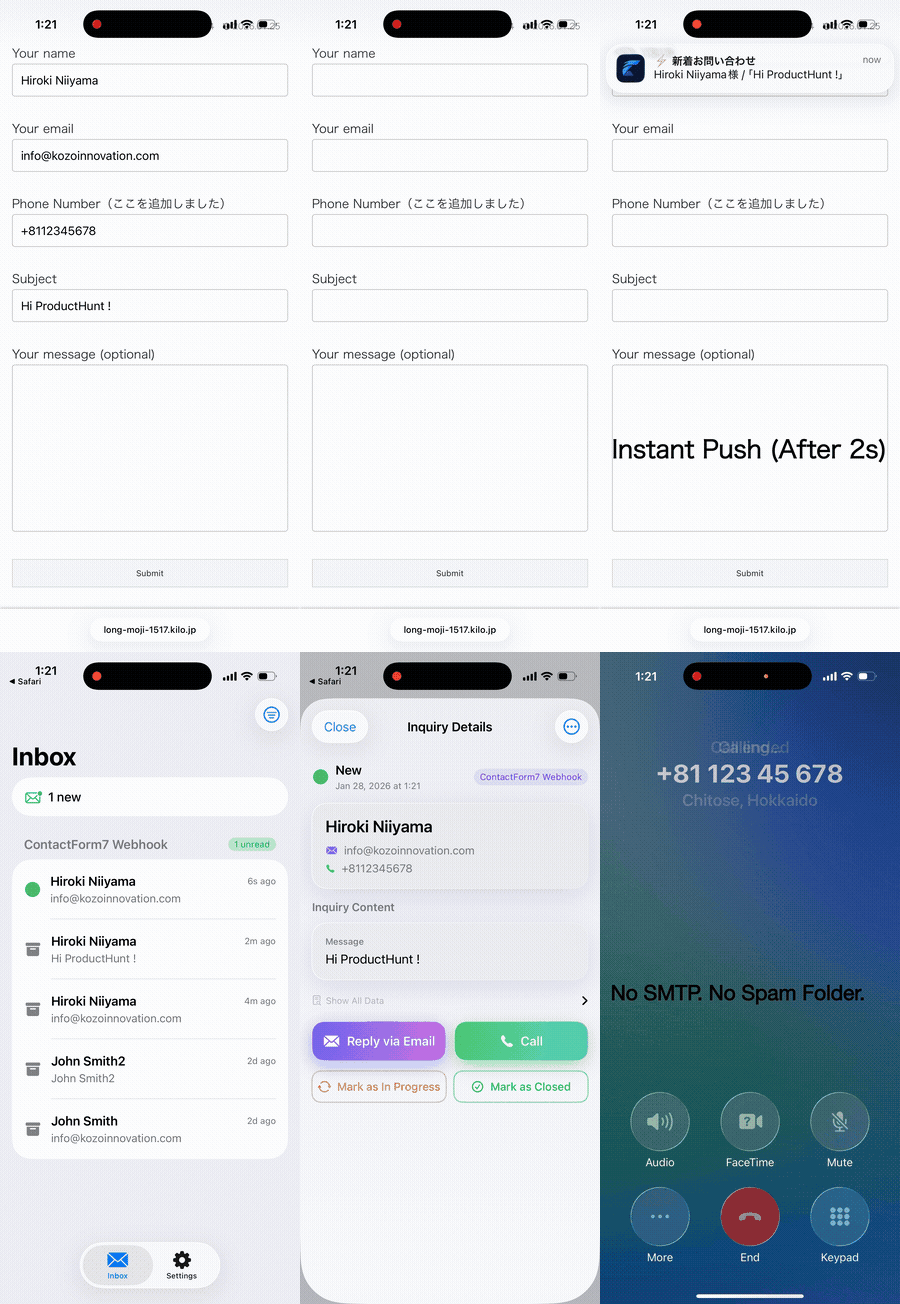
That's exactly what webhook-to-push notification services do:
- Form is submitted
- Webhook fires instantly
- Push notification arrives on your phone
- Total time: 2 seconds
No email servers. No queues. No delays.
How ZeroContact Works
ZeroContact is a simple solution designed for exactly this problem:
- Add a webhook URL to your form plugin (Contact Form 7, WPForms, Gravity Forms, etc.)
- Install the ZeroContact app on your phone
- Receive instant notifications whenever someone submits a form
That's it. No complex setup. No monthly fees for basic usage. Just instant notifications.
Getting Started in 5 Minutes
Here's how to set up instant form notifications:
Step 1: Create a ZeroContact Account
Sign up at ZeroContact and get your unique webhook URL.
Step 2: Add the Webhook to Your Form
For Contact Form 7 (No-Code Method - Recommended):The easiest way is to use the CF7 to Webhook plugin. It's trusted by over 30,000 WordPress websites:
- Install and activate "CF7 to Webhook" plugin
- Go to your Contact Form 7 form settings
- Find the "Webhook" tab
- Paste your ZeroContact webhook URL
- Done! No coding required.
📺 Watch the setup guide: How to connect Contact Form 7 to ZeroContact
💡 Troubleshooting: If saving the webhook URL fails, try temporarily disabling your server's WAF (Web Application Firewall) security. Some hosting providers block external URLs by default.For Contact Form 7 (Code Method):
If you prefer code, add this to your theme's functions.php:
add_action('wpcf7_mail_sent', function($cf7) {
wp_remote_post('YOUR_WEBHOOK_URL', [
'body' => json_encode($cf7->get_posted_data())
]);
});
Go to Settings → Notifications → Add New → Choose Webhook
For Gravity Forms:Install the Webhooks Add-On and add your URL
Step 3: Share the QR Code
ZeroContact generates a unique QR code for each form. Share this QR code with your client (via email, LINE, or any messenger).
Step 4: Client Scans the QR Code
Your client downloads the ZeroContact app (iOS/Android), scans the QR code, and they're done. No account creation, no password, just scan and receive.
Step 5: Test It
Submit a test form and watch the notification arrive on your client's phone in seconds.
But What About Email?
Here's the thing: you don't have to choose.
- Email = Logs (permanent record, searchable history)
- ZeroContact = Alerts (instant response, real-time awareness)
Keep your email notifications for record-keeping. Use ZeroContact for the moment that matters—when a potential customer is right now waiting for a response.
Related Articles
- Contact Form 7 Email Delay: 5 Reasons Why Your Leads are Late
- WPForms vs. Real-time Notifications
- Why Your Elementor Form Emails Go to Spam
- The Hidden Cost of Email Delay
Conclusion
Email notifications served us well for decades, but in 2026, they're no longer enough for time-sensitive leads.
The businesses that respond first, win first.Don't let email delays cost you another customer. Switch to instant push notifications and never miss a lead again.
---
Ready to get instant form notifications? Get started with ZeroContact →Experience 2-Second Notifications
Solve your form notification delays with ZeroContact
Get Started Free