Contact Form 7 Email Delay: 5 Reasons Why Your Leads are Late (2026 Fix)
CF7 emails taking forever? Learn why Contact Form 7 notifications are delayed and how to get instant push notifications instead of waiting 5-20 minutes.
Your client just filled out their contact form. They're excited. They're ready to buy.
But you? You won't know for another 20 minutes.
By then, your competitor—who uses instant notifications—has already called them back.
This is the hidden problem with Contact Form 7's email notifications. Let's fix it.
Why is Contact Form 7 Email Slow?
CF7 is the most popular WordPress form plugin (5+ million active installations). But its email notifications have a fundamental flaw: they rely on your server's mail system.
Here are the 5 reasons your CF7 emails are delayed:
1. Server Mail Queue Congestion
Most shared hosting servers batch outgoing emails to prevent spam. Your CF7 notification sits in a queue with hundreds of other emails, waiting its turn.
Typical delay: 5-30 minutes2. SMTP Configuration Issues
If you're using SMTP (like WP Mail SMTP), misconfiguration can cause silent failures or retries. The plugin tries, fails, waits, tries again...
Typical delay: 10-60 minutes (or never)3. Gmail/Outlook Throttling
Email providers throttle incoming messages from unknown sources. Your perfectly crafted notification lands in spam—or gets delayed while they "verify" the sender.
Typical delay: Variable (sometimes hours)4. PHP mail() Function Limitations
CF7 uses PHP's mail() function by default. Many hosts disable or limit this function for security reasons, causing unpredictable delivery.
5. DNS/SPF/DKIM Problems
Missing or incorrect email authentication records make your emails look suspicious. Providers delay delivery while they check if you're legitimate.
Typical delay: 15-60 minutesThe Real Cost of Late Notifications
Let's do the math:
- Response within 5 minutes: 100x more likely to reach and qualify a lead
- Response after 30 minutes: Lead is already talking to your competitor
- Response after 1 hour: Lead has forgotten they even inquired
For a business getting 10 leads per day at $500 per customer, even a 10% conversion improvement means $500/day in additional revenue.
That's $15,000/month lost to email delays.
The Solution: Skip Email Entirely
Here's the thing: email was never designed for real-time alerts.
The solution is webhook-to-push-notification. When someone submits your CF7 form:
- CF7 sends a webhook (instant)
- ZeroContact receives it (instant)
- Your phone buzzes (0.5 seconds later)
No email server. No queue. No spam filter. Just instant.
How to Set Up Instant CF7 Notifications
Method 1: Using CF7 to Webhook Plugin (No Code)
The easiest way—perfect for non-developers:
- Install CF7 to Webhook plugin
- Go to your Contact Form 7 form settings
- Find the "Webhook" tab
- Paste your ZeroContact webhook URL
- Save
📺 Video tutorial: Watch the CF7 setup guide on YouTube
⚠️ Troubleshooting Tip: If you can't save the webhook URL, your WAF (Web Application Firewall) might be blocking it. Temporarily disable your security plugin, save the URL, then re-enable.
Method 2: Using Code (For Developers)
Add this to your theme's functions.php:
add_action('wpcf7_mail_sent', function($contact_form) {
$submission = WPCF7_Submission::get_instance();
$data = $submission->get_posted_data();

wp_remote_post('YOUR_ZEROCONTACT_WEBHOOK_URL', [
'body' => json_encode($data),
'headers' => ['Content-Type' => 'application/json']
]);
});
Step 3: Share the QR Code
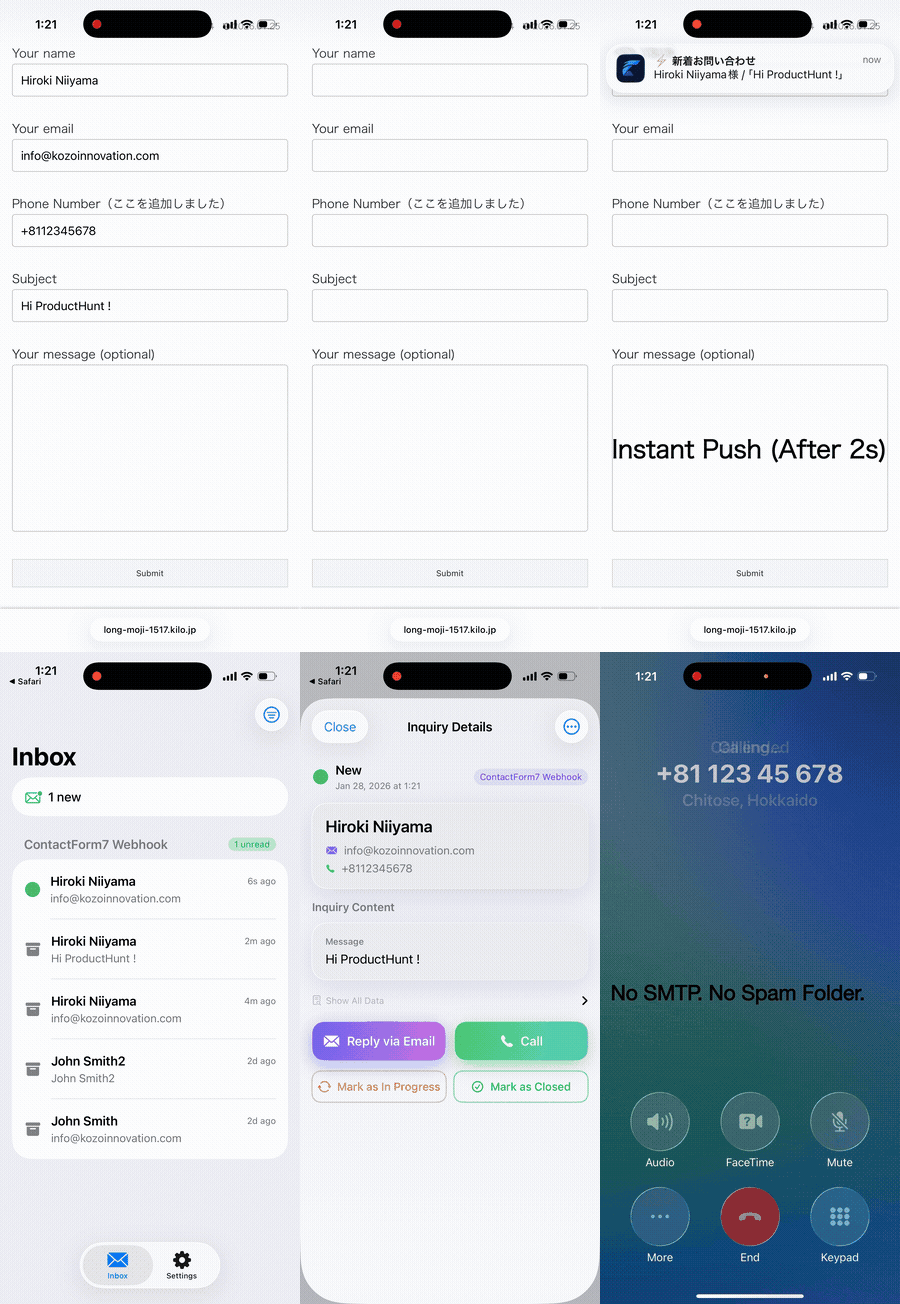
ZeroContact generates a unique QR code for each form. Share this QR code with your client (via email, LINE, or any messenger).
Step 4: Client Scans the QR Code
Your client downloads the ZeroContact app (iOS/Android), scans the QR code, and they're done. No account creation, no password, just scan and receive.
Step 5: Test It
Submit a test form and watch the notification arrive on your client's phone in seconds.
But What About Email Records?
Here's the thing: you don't have to choose.
- Email = Logs (permanent record, searchable history)
- ZeroContact = Alerts (instant response, real-time awareness)
Keep your CF7 email notifications for record-keeping. Use ZeroContact for the moment that matters—when a lead is right now waiting for a callback.
Related Articles
- WPForms vs. Real-time Notifications: How to Get Alerts in 2 Seconds
- Why Your Elementor Form Emails Go to Spam (and How to Fix It)
- How to Bypass SMTP for Faster Form Submission Alerts
- The Hidden Cost of Email Delay: Why 5 Minutes is Too Long
Conclusion
Contact Form 7 is great for building forms. But for notifications? Email is a 1990s solution to a 2026 problem.
Your leads expect instant responses. Your clients are losing deals while emails sit in queues.
The fix takes 5 minutes. The impact lasts forever.---
Ready to get instant CF7 notifications? Get started with ZeroContact →Experience 2-Second Notifications
Solve your form notification delays with ZeroContact
Get Started Free